Platform, Security, Workplace
Stop Guessing Your Azure Bill: A Practical Guide to Cloud Cost Control

Platform, Security, Workplace
Microsoft has introduced the Azure Virtual Network Routing Appliance (VNRA) into public preview, a new first-party service designed for high-throughput network forwarding within Azure. This analysis covers its purpose, ideal use cases, current limitations, and how it fits into existing hub-spoke network topologies.
Why now? the container + AI perfect storm
Let’s talk about what’s actually driving this. Two major trends have been colliding:
First, container adoption is absolutely everywhere. We’ve moved past the “should we containerize?” phase into “everything runs in containers.” That means more images, more versions, more artifacts. Second, and this is the big one; AI has entered the chat. Large language models, vision models, agent frameworks, and all their dependencies are huge. We’re talking models that are gigabytes by themselves, plus all the tooling and inference containers around them. The result? Enterprises started hitting that 40 TiB wall way faster than anyone predicted.
The real pain of storage limits
If you’ve never run into registry limits, consider yourself lucky. For teams operating at scale, that 40 TiB ceiling created some real headaches:
Registry Sprawl: Teams got forced into running multiple registries just to stay under limits. Suddenly you’re managing access policies, networking rules, and monitoring across five different places instead of one. Not fun.
Garbage Collection for the wrong reasons: Instead of cleaning up images based on actual business needs, teams were deleting stuff just to free up space. “Do we really need this six-month-old build?” becomes a conversation you have way too often.
Capacity planning anxiety: AI workloads are growing exponentially. Nobody could confidently say, “Yes, we can store all our new model artifacts in our primary registry.” That uncertainty sucks when you’re trying to scale.
Slow global rollouts: Geo-replication is fantastic, but syncing massive amounts of data to new regions took time. When you’re expanding globally, waiting on registry syncs isn’t how you want to spend your time.
What’s Actually Changing
Here’s the breakdown:
| SKU | Previous | New |
|---|---|---|
| Premium SKU Storage Limits | 40 TB | 100 TB |
| Basic/Standard SKU Limits | Unchanged | Unchanged |
And here’s the best part: you don’t have to do anything. No migration, no feature flag, no configuration change. Your Premium registry can now just… grow. It’s automatically available everywhere Premium SKU is offered. They’ve also improved geo-replication sync speeds when you’re adding new replicas globally. So expanding your footprint gets faster too.
Who Actually Benefits From This?
This isn’t just a theoretical upgrade. Specific teams are going to feel this immediately:
Platform Engineering Teams: If you’re running a centralized registry for hundreds of dev teams, you’ve been watching that storage graph creep upward. Now you’ve got breathing room.
AI/ML Teams: Storing large models, training outputs, and inference containers just got way less stressful. Keep all your artifacts in one place.
VM Migration Teams: If you’re still moving legacy workloads into containers, you don’t have to worry about storage midway through the migration.
Global Enterprises: With geo-replication, that 100 TiB gets replicated across regions. So your global footprint scales with you.
I’ve heard from some of the largest AI and financial services organizations that they were running right up against that 40 TiB limit. This change is immediate relief for them.
Checking Your Usage
Curious where you stand? Here’s how to check:
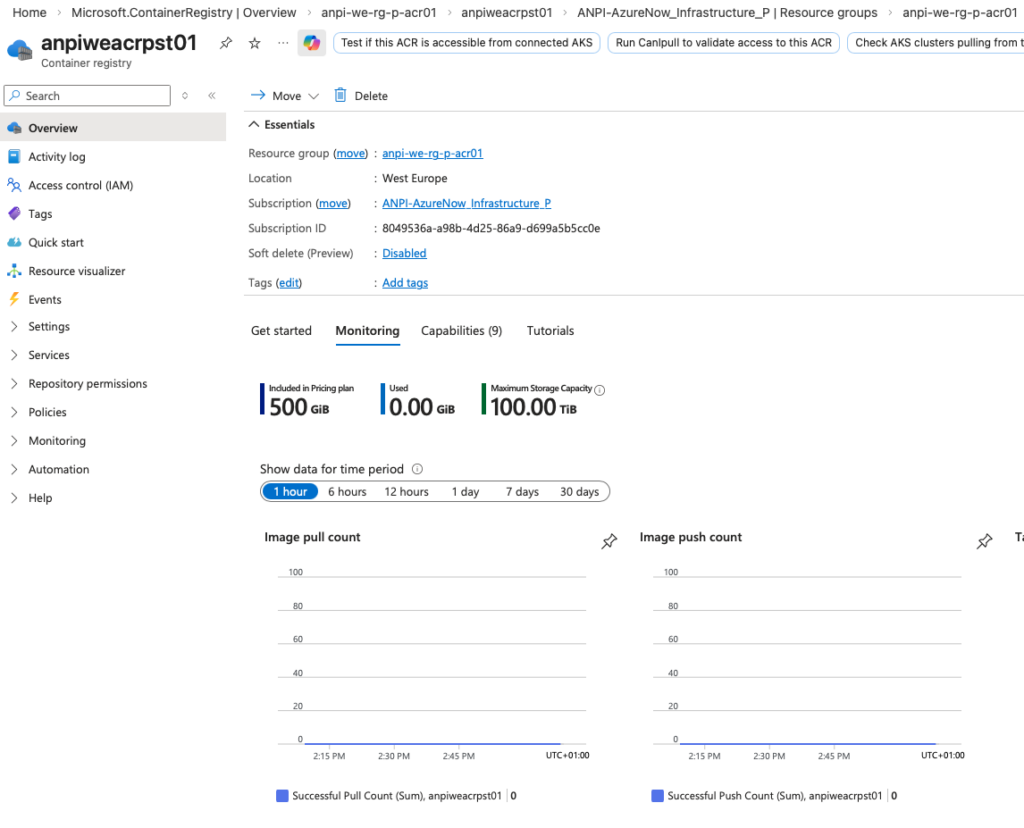
Via Azure Portal: Head to your registry’s Overview blade, then check the Monitoring tab. You’ll see current consumption and the new 100 TiB limit.
Via CLI: Run this: az acr show-usage –name myregistry –output table
And what if you are not on premium storage?
The 100 TiB limit is exclusive to Premium SKU. If you’re on Basic or Standard and need the headroom, upgrading is straightforward: Run the following command: az acr update –name myregistry –sku Premium
Premium also gets you geo-replication, private endpoints, enhanced throughput, and the other enterprise goodies. So if you’ve been on the fence, this might be the nudge.
Summary and Initial Assessment
This move tells me Microsoft is paying attention to where the industry is heading. Container adoption isn’t slowing, AI workloads are exploding, and registry storage needs to keep pace. If you’ve been managing around storage limits, this is your cue to simplify. One registry. 100 TiB. No more gymnastics.
