Platform, Security, Workplace
Stop Guessing Your Azure Bill: A Practical Guide to Cloud Cost Control

Platform, Security, Workplace
08/03/2026
Microsoft has introduced the Azure Virtual Network Routing Appliance (VNRA) into public preview, a new first-party service designed for high-throughput network forwarding within Azure. This analysis covers its purpose, ideal use cases, current limitations, and how it fits into existing hub-spoke network topologies.
What is the Azure Virtual Network Routing Appliance?
VNRA is a managed Platform-as-a-Service (PaaS) offering, abstracting the underlying infrastructure. Unlike traditional Network Virtual Appliances (NVAs) deployed on virtual machines, Microsoft states VNRA runs on specialized networking hardware. Its primary function is high-performance, low-latency routing for east-west traffic between virtual networks.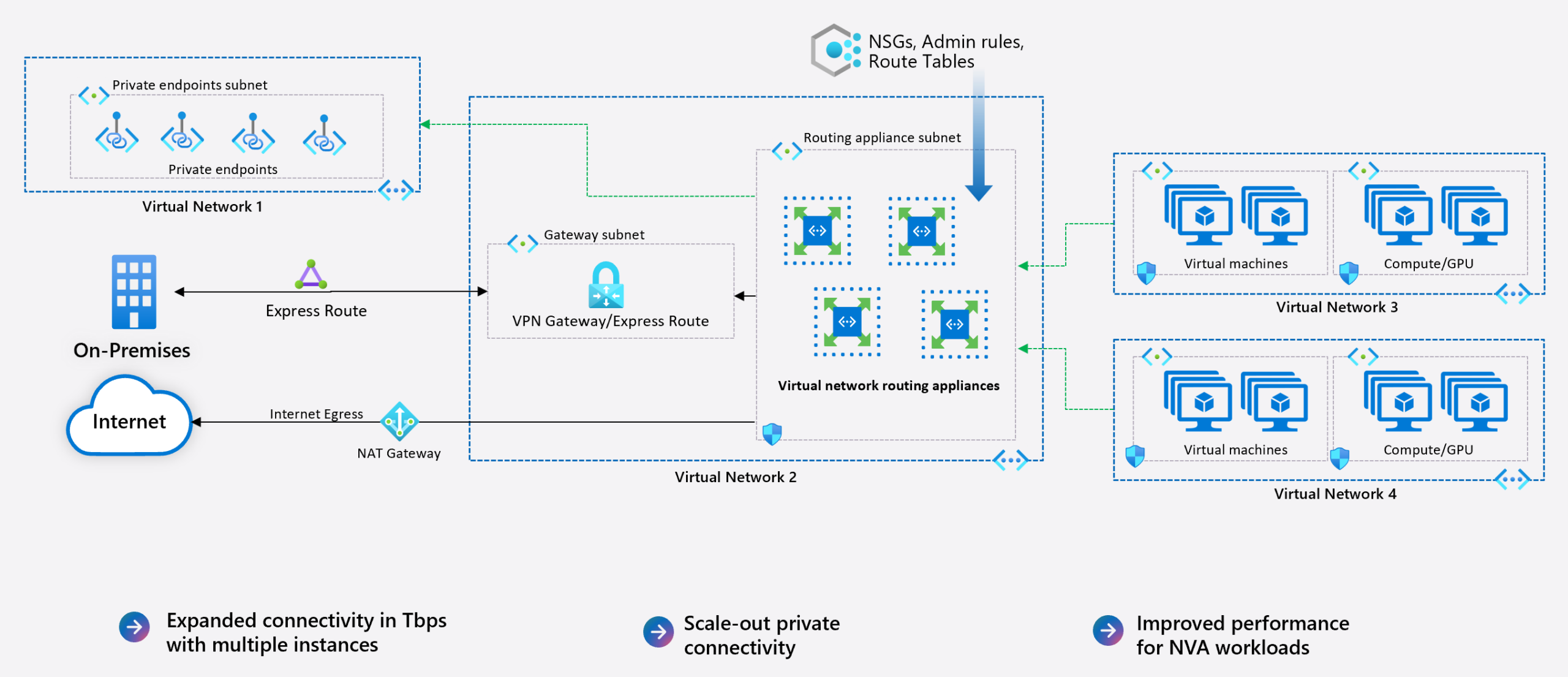
During the preview, customers can select throughput capacities of 50, 100, or 200 Gbps, with a limit of two instances per subscription. It’s important to note that this capacity refers to the appliance’s throughput; actual performance to endpoints is still subject to the bandwidth limits of the destination Azure resources, such as specific VM SKUs.
The Primary Use Case: Solving Non-Transitive VNet Peering
The core challenge VNRA addresses is the non-transitive nature of VNet peering. In a standard hub-and-spoke topology:
– Spoke VNets are peered to a central Hub VNet.
– The Hub can communicate directly with each Spoke.
– Spoke VNets cannot communicate directly with each other via peering.
Traditionally, to enable Spoke-to-Spoke communication, traffic must traverse the Hub and be forwarded by a routing device, typically a firewall (like Azure Firewall) or a third-party NVA. VNRA provides a dedicated, high-throughput forwarding plane specifically for this transitive routing scenario.
VNRA vs. Firewall: A Question of Scope
It’s critical to understand that VNRA is a router, not a firewall. It performs no packet inspection, filtering, or logging. Therefore, it does not replace a firewall in a security-conscious design. The decision involves trade-offs between performance and security:
– Firewall-Centric Design (Zero Trust):
Sending all traffic—both east-west (Spoke-to-Spoke) and north-south (to/from on-premises or internet)—through a firewall enables security policy enforcement and centralized logging. However, this can create throughput bottlenecks, particularly for large-scale east-west data transfers. While Azure Firewall can autoscale, it may not be instantaneous. NVA-based designs require careful capacity planning and scaling up VM SKUs.
– VNRA-Centric Design:
Using VNRA exclusively for east-west traffic offloads this forwarding task from the firewall. This allows north-south traffic to be inspected by the firewall without competing for bandwidth with internal traffic, potentially optimizing both performance and security.
Hybrid Architecture: Combining VNRA and Firewall
A viable approach is to deploy both services within the same Hub VNet, using User-Defined Routes (UDRs) to steer traffic based on destination:
– Model 1 (Traffic-Type Segregation): UDRs on Spoke subnets can send traffic destined for other Spokes directly to the VNRA’s IP address. A default route (0.0.0.0/0) can send all other traffic (e.g., to the internet or on-premises) to the firewall for inspection.
– Model 2 (Sequential Processing): Route all traffic from Spokes to the VNRA first. Then, configure routes on the VNRA’s own subnet to forward north-south traffic to the firewall/gateway and east-west traffic directly to the destination Spoke VNet. This centralizes the routing decision point.
Deployment and Configuration: Current State
Deployment is streamlined but currently limited. Key steps and constraints include:
1) Region and Subnet: Deploy to a supported preview region and select the target Hub VNet. A dedicated subnet named VirtualNetworkApplianceSubnet is required.
2) Capacity Selection: Choose the desired throughput (50, 100, or 200 Gbps). The service is free during the preview.
3) Configuration: The VNRA itself has no configurable settings. NSGs and route tables can be applied to its subnet.
4) Routing: Traffic steering relies entirely on standard Azure mechanisms. To enable spoke-to-spoke routing, add a UDR on Spoke A’s route table for Spoke B’s address prefix, with the next hop set to “virtual appliance” and the IP address of the VNRA instance. A reciprocal route must be added on Spoke B.
5) Preview Limitations:
– No Private Link support.
– No IPv6 support.
– No Global VNet Peering support.
– No metrics or diagnostic logs are currently available.
– VNRA is not supported for production workloads, it’s meant for testing and feedback.
– Each subscription is limited to two instances during preview.
– Tools like Azure CLI, Terraform, and PowerShell support are still in progress.
To experiment with VNRA in your environment you can take the following steps:
– Enable the public preview in your Azure subscription via Azure Feature Exposure Control (AFEC).
– Create a VirtualNetworkApplianceSubnet in the VNet where you want the appliance.
– Deploy the Virtual Network Routing Appliance resource in that subnet.
– Update your route tables to direct traffic toward the appliance as your next hop.
Summary and Initial Assessment
Azure Virtual Network Routing Appliance addresses a specific, long-standing challenge in Azure networking: providing a high-throughput, transitive routing path between peered VNets without the overhead of stateful inspection. It is a purpose-built service for performance, not a general-purpose security or networking tool.
For new deployments following a secure hub-spoke model, Azure Firewall (or an NVA) remains the recommended default for its security and logging capabilities. VNRA may find its place in niche scenarios, such as:
– Modernizing legacy architectures that rely on complex transitive routing.
– Environments with massive east-west data flows that would saturate a firewall’s throughput.
– As a high-performance forwarding component in a layered network design, complementing a firewall for north-south traffic.
The service’s value proposition will become clearer upon general availability, particularly with the announcement of its pricing model and the addition of key features like logging and Private Link support.
For now, it represents an interesting new tool for specific high-performance routing requirements within Azure.
For the most current information on supported regions and updates, please refer to the official Azure Virtual Network Routing Appliance documentation.
